LightReach Direct Pay Integration Guide
In order to integrate with us you should first reach out to Palmetto LightReach before starting any development
Section titled “In order to integrate with us you should first reach out to Palmetto LightReach before starting any development”Summary
Section titled “Summary”LightReach’s Direct Pay program allows LightReach to directly pay participating Distributors for equipment used by an enrolled EPC for LightReach installations. The program allows Installers (“EPCs”) to order equipment on a per-job basis directly with the Distributor, with LightReach paying the Distributor for the equipment directly. Equipment costs are netted from EPC payments, reducing cash flow burden on EPC and providing greater payment certainty to the Distributor.
LightReach strongly recommends automated integrations with Distributors systems. This ensures direct, real-time information sharing and prevents delays and errors inherent in manual processes. This guide is designed to introduce interested Distributors to how these integrations work.
Terminology
Section titled “Terminology”- LightReach (“LR”) - Financier who provides financing to Customers to do home improvements. Partners with EPCs and Distributors to serve those Customers. Has a formal relationship with Distributor, EPC, and Customer.
- Distributor - Company that supplies equipment and other services to EPCs. Has a formal relationship with LR and EPC.
- EPC - Home improvement contractor or installer. In the Direct Pay context, they are approved by LightReach and the Distributor to participate in the program. Has a formal relationship with both LR and Distributor.
- Customer - Homeowner that hires the EPC to complete a home improvement project on their home and is contracting with LightReach to provide the financing for the project. Has a formal relationship with LR, and via LR to the EPC.
- Account - The account within LightReach that brings together information about the Customer, the equipment being installed, the EPC, the Distributor being used by the EPC, and the timing and financing associated with each.
- Distributor EPC ID (aka “installerIdentifier”) - The unique identifier set by the Distributor for the EPC. Has a 1:1 relationship with a LR EPC ID.
- Distributor Project ID - The unique identifier set by the Distributor for the project being installed at the Customer’s house by the EPC. Has a 1:1 relationship a LR Account ID.
- LR EPC ID (aka “alias”) - The unique identifier set by LR for the EPC. Has a 1:1 relationship with a Distributor EPC ID.
- Account ID - The unique identifier set by the LR for the project being installed at the Customer’s house by the EPC. Has a 1:1 relationship with a Distributor Project ID.
- Notice to Proceed (“NTP”) - LR milestone representing that the financing is approved and the EPC can proceed with permitting, ordering materials, and construction. LR triggers “Project Creation” (see below) when we issue NTP.
- Install Submission - LR milestone that occurs when the EPC submits their package of proof (documents and pictures) to LR and attests that the installation is complete. Trails actual construction work. Kicks of the LR quality control process.
- Install Approved - LR milestone showing that LR has completed the LR quality control process and approved the EPC package of proof that the installation is complete.
- Finalization - Distributor milestone representing that the EPC has finalized all orders connected to the LR Account and that all Distributor invoices are final and ready for payment (pending EPC reaching Install Submission or Install Approved, whichever represents their Install-related payment event).
- LightReach Status - General status in LR system. Options are listed under the LR GET Account ID at https://docs.palmetto.com/api/finance#/Accounts/get_api_accounts_accountId
- Distributor Status: General account status in Distributor system
- Pending - Account is active but has not been finalized.
- Finalized - Follows “Pending”. Equipment has not yet been shipped, but no additional equipment or cost will be added to the account for which LR will be responsible for paying.
- Shipped - Follows “Finalized”. Equipment has been shipped to the EPC.
- Cancelled - Account is no longer Active
- Invoice Status - General invoice status in Distributor system
- Pending - In process but not sent for payment
- Sent - Sent to LR for payment
- Paid - Paid by LR
- Voided - No longer active
Process
Section titled “Process”1. EPC Onboarding (manual)
Section titled “1. EPC Onboarding (manual)”a. Candidate EPCs may be identified by LightReach or Distributors.
b. EPCs must be approved for participation by both LightReach and the Distributor.
c. Once an EPC is approved to participate, they will be enabled in the LightReach system and their go-forward LightReach accounts will be eligible to participate in the program.
- The Distributor must provide the Distributor EPC ID for each EPC to LightReach. This ID will be used in all future communications to identify the EPC associated with a specific project.
- LightReach accounts that pre-date enablement must be opt-ed into the program manually by the EPC.
d. LR Onboarding Team manages EPC enrollment and updates in the LR system.
2. Required interactions specific to each project (automated)
Section titled “2. Required interactions specific to each project (automated)”Note - these are API interactions and not currently supported by any in-portal features or ability to manually engage.
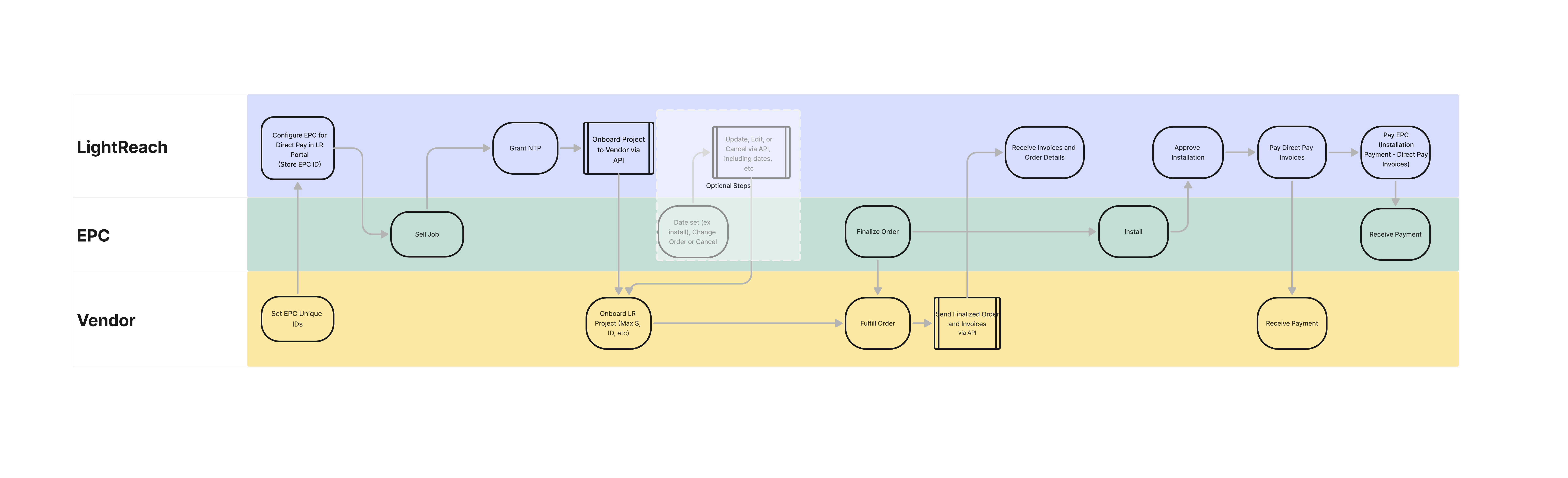
a. Project Creation: LR tells the Distributor about a project that has been approved for financing. Distributor receives this information and provides confirmation of receipt.
- See “Project Creation” below.
b. Update Project: Changes in the LR system require statuses to be updated by LR to Distributor on all projects and project details on some projects.
- See “Update Project” below
c. Distributor Status: Distributor tells LR as status changes in their system, most importantly that equipment has been purchased by the EPC and how much is owed to Distributor by LR for that specific project.
- See “Project Finalization Webhooks” below
3. Payment (automated)
Section titled “3. Payment (automated)”a. LR will release payment directly to the Distributor on agreed-upon payment terms and milestones.
b. Payment will be sent electronically. Specific method (ACH, RTP, Wire, etc) per agreed-upon payment terms.
c. Payments will be made in bulk and be accompanied by a remittance report that specifies which projects are covered in this payment. Data will include line items per LR Account ID and include invoice numbers, payment amounts, Distributor EPC ID, Distributor Project ID, LR EPC ID, and additional information required to reconcile the bulk payment with specific receivables in your accounting systems.
d. All payment detail is available in the LR Portal
API Overview
Section titled “API Overview”API’s of direct pay partner that LightReach will hit:
Section titled “API’s of direct pay partner that LightReach will hit:”- Project creation (POST)
- Project update (PATCH or PUT possible)
- Project get (GET)
- Get Invoice document - endpoint to fetch from direct pay partner the pdf (or html) file of a specific invoice (GET)
- Get Invoices - API to surface the same content as described in Project Finalization webhook payload body, including an Invoice Status (e.g. pending, sent, paid, voided) (GET)
- Verify installer id exists
/installers/:installerId(GET)
API direct pay partner will hit Palmetto LightReach:
Section titled “API direct pay partner will hit Palmetto LightReach:”- Project Finalization Webhook with invoice meta data
1) Project Creation
Section titled “1) Project Creation”Once a project in our system has reached Notice to Proceed, LightReach will post (via HTTP POST) some high level system details to your system in order to notify you of the project and the EPC to whom it belongs.
Request Body:
Section titled “Request Body:”{ customerName: string, // 'the name of the homeowner', address1: string, // 'the address line 1 of the install location', address2: string, // 'the address line 2 of the install location', city: string, // the city of the install location, state: string, // 'the state of the install location' zip: string, // 'the zip code of the install location', identifier: string, // 'the unique LightReach account/project identifier, installerIdentifier: string, // 'the installers unique identifier in your system', projectCost: number, // 'the total project cost', systemSize: number, // 'the system size in KW', ntpDate: ISO date string, // 'the date the project achieved NTP (e.g. '2025-01-01T22:23:28.404z') lrStatus: string, // `e.g(active)`}The response from this API call should return a 200 response code, along with a payload indicating the unique identifier for the project in your system. The expectation is that we use this value in subsequent communications between our systems to link the projects.
Important Notes:
- If we send an
installerIdentifierin the body that you don’t recognize, the expectation is that your endpoint will error with some helpful error message. - If we send
identifier(our id, i.e “1234”) of an account that already has had a project created for it in your system the expectation is that we would receive an error which would include an error message, and another propertyprojectIdentifier(“98765”) of the id in your system that corresponds to the identifier id we sent.
Response Body:
Section titled “Response Body:”{ projectIdentifier: string; // the identifier you wish us to use for correlating the project in your system with the project in our system.}2) Update Project
Section titled “2) Update Project”Throughout the life of a project in our system, there will be various points at which meaningful information changes that you may be interested in, such as project status, or system size/project cost changes which may be useful to you in order to manage your supply chain. As such, the recommendation is to support an HTTP PATCH (can also support PUT) API endpoint to communicate updates to the project as they occur. We will use the projectIdentifier property returned from create project as the unique identifier for these calls (e.g. <your API URL>/projects/<projectIdentifier>). For this, we would expect all properties to be optional:
Request Body:
Section titled “Request Body:”{ customerName: string, // Optional: only provided if the value changes address1: string, // Optional: only provided if the value changes address2: string, // Optional: only provided if the value changes city: string, // Optional: only provided if the value changes state: string, // Optional: only provided if the value changes, zip: string, // 'Optional: the zip code of the install location', installerIdentifier: string, // 'Optional: the installers unique identifier in your system', systemSize: number, // Optional: only provided if the value changes projectCost: number, // Optional: only provided if the value changes ntpDate: ISO date string, // Optional: 'the date the project achieved NTP (e.g. '2025-01-01T22:23:28.404z') lrStatus: string, // Optional: e.g(active, opt-out, cancelled,etc.)}Note on lrStatus:
-
‘active’. === first status we send you when we call your create project API or when they have opted out and then opt back in
-
‘opt-out’ === opting out of using direct pay for that account/installation
-
‘cancelled’ === account in lightReach was completely cancelled with us
-
‘install-submitted’ === still active, but the installer submitted their install package
-
‘substantial-completion’ === still active, but the installer had their install package approved (2nd to last step in the pipeline with us)
-
‘permission-to-operate’ === still active, but the installer had their activation approved (last step in their pipeline with us)
Most material vendors only really pay attention to the “opt-out” or “cancelled” statues as everything else is just a nice to have/know
3) Project Finalization Webhooks
Section titled “3) Project Finalization Webhooks”Important: This endpoint does not accept updates after initial submission. If corrections are needed, see Handling Invoice Corrections below.
Prod: https://palmetto.finance/api/webhooks/direct-pay/invoices
Next: https://next.palmetto.finance/api/webhooks/direct-pay/invoices
We will need communication back from you via a webhook once you have finalized the invoices for a project. We will assign you a specific API Key which will enable you to post data to our direct pay invoice API that will uniquely identify your system and which projects you have access to. The API key will be passed in the header of the POST request (e.g. { 'x-api-key': <your api key> }). This should be sent only once per project.
Request Body:
Section titled “Request Body:”{ projectIdentifier: string, // Your project identifier previously returned vendorIdentifier: string, // A value that uniquely identifies the direct pay vendor, we will assign it to you. totalInvoicedAmount: number, finalizationDate: ISO date string, // 'the date invoices were finalized (e.g. '2025-01-01T22:23:28.404z') invoices: [ // The list of invoices for this project { invoiceId: string, // id we can use to later get pdf/html invoiceNumber: string, // Your internal invoice number invoiceDate: ISO date string, // Your invoice date totalAmount: number, // The total amount of the invoice invoiceStatus: string, // pending, sent, paid, voided lineItems: [ { manufacturerCode: string, // Optional if you don't track this manufacturerName: string, // The name of the equipment manufacturer productCode: string, // Your internal product code/sku number description: string, // The product description quantity: number, // The number of units included on the invoice unitPrice: number, // Optional, we will calculate it if not provided totalAmount: number // The total line item amount }, ], }, ],}Additional Required APIs
Section titled “Additional Required APIs”In addition to the Create Project and Update Project API’s listed above, there are a couple of others that we will need access to in your system. Specifically:
- Get Project Details - This will help us determine if any meaningful project data has changed so we can update you.
- Get Invoice Documents - Retrieves electronic versions of your invoices (PDF). This is needed for the complete accounting record of these transactions and are reviewed by our finance team.
- Get Invoices - Retrieve the invoice list and data for a project.
- Verify installer id exists
/installers/:installerId(GET)
4) Get Project Details
Section titled “4) Get Project Details”This would be an HTTP GET request to your API using the projectIdentifier returned from Create Project. We would want the data in the sample response body below. We can work with you if you have a different payload you currently provide or want to send additional properties that you expose if you think they are valuable for us to track. (e.g. <your API URL>/projects/<projectIdentifier>).
Response Body:
Section titled “Response Body:”{ customerName: string, address1: string, address2: string, city: string, state: string, zip: string, identifier: string, // 'the unique LightReach account/project installerIdentifier: string, // 'the installers unique id in your system' ntpDate: ISO date string, // 'date we may have sent the project achieved NTP' lrStatus: string, // our status we may have sent you (if at all) systemSize: number, projectCost: number, distributorStatus: string,// pending, finalized, shipped, cancelled invoiceStatus: string, // pending, sent, paid, voided}5) Get Invoice Document
Section titled “5) Get Invoice Document”API to return us a specific invoice’s base64 encoded PDF (or html).
I.E GET YourBaseApiUrl/Invoices/:invoiceId
6) Get Invoices
Section titled “6) Get Invoices”API to surface the same content as described in Project Finalization webhook payload body above, including an Invoice Status (e.g. pending, sent, paid, voided)
I.E GET YourBaseApiUrl/Invoices?projectIdentifier=${projectIdentifier}
7) Verify Installer Id exists in your system
Section titled “7) Verify Installer Id exists in your system”Verify installer id(the installer company id in your system) exists in your system (i.e. /installers/:installerId) (GET). This is helpful when setting up an EPC (installer) on our end and helps prevent errors at the time of project creation.
Response Body:
Section titled “Response Body:”{ exists: boolean;}**Handling Invoice Corrections
Section titled “**Handling Invoice Corrections”Important: Our system treats invoice metadata as immutable. Once an invoice ID is received, we cannot accept updates or changes to that data. If an error is identified (such as an accidental sales tax charge, or a extra item added, etc), a new transaction is required to reconcile the balance.
Correction Workflow
Section titled “Correction Workflow”When a correction is needed, follow these steps:
1. Initial Submission
Section titled “1. Initial Submission”Your system sends the metadata for the original invoice (e.g., Invoice 001 for $1,100). Our system then uses that ID to fetch the physical invoice file via your API. At this point, the transaction is considered complete.
2. Identifying the Error
Section titled “2. Identifying the Error”If it is determined that the invoice should have been $1,000 (because the $100 sales tax was added in error), do not attempt to update the metadata for Invoice 001.
3. Issuing a Credit
Section titled “3. Issuing a Credit”To correct the balance, your system must generate a new, unique invoice ID (e.g., Invoice 002) representing a $100 credit.
4. Completing the Loop
Section titled “4. Completing the Loop”You must send a new webhook for this credit invoice. Our system will then download the new physical document (Invoice 002) via the API to offset the original overcharge, ensuring the accounting records are properly reconciled.